Test with real data at scale
Define datasets with typed columns, reference data in any step field, and let CFTR automatically iterate your tests across every row. One test definition, hundreds of data variations, complete coverage.
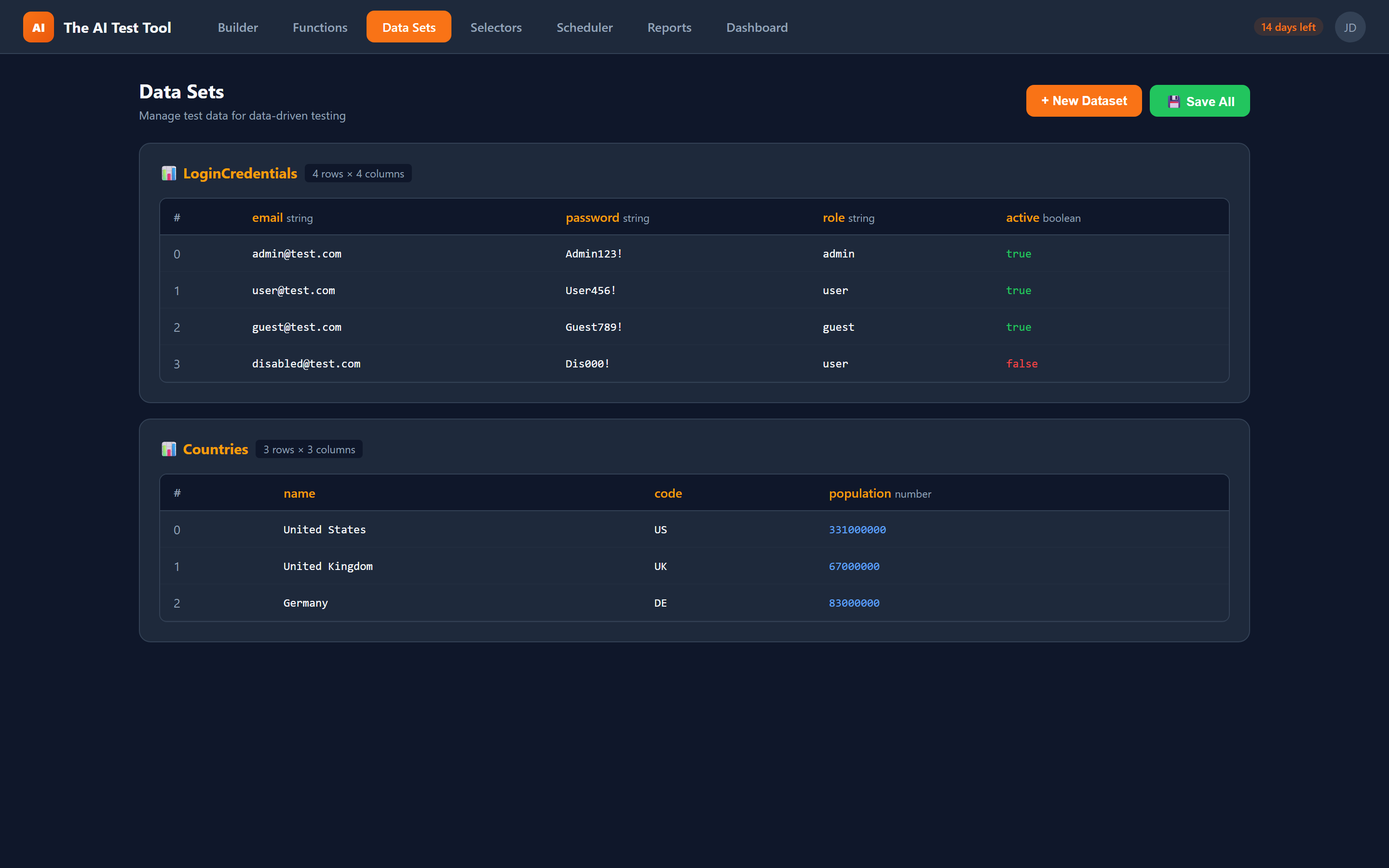
How it works
Data-driven testing in CFTR follows a straightforward workflow: define data, reference it in your test steps, and let the platform handle iteration and code generation.
Define your dataset
Use the CSV-style dataset editor to create columns with typed values (string, number, boolean). Add as many rows as your test scenario requires — from a handful of edge cases to hundreds of data variations.
Reference data in steps
Insert data references into any step field using the $dataset:Name.field syntax. For specific rows, use $dsrow:Name.idx.field. The builder validates your references in real time so you catch errors before execution.
Auto-generated loop code
CFTR automatically generates TypeScript for...of loops that wrap your test steps. Each iteration runs the complete test flow with a different row of data, producing individual pass/fail results per data row.
Review results per row
After execution, reports break down results by data row so you can see exactly which data combinations passed and which failed. Pinpoint data-specific issues without manual investigation.
Powerful data management capabilities
CFTR's data-driven testing goes beyond simple parameterization. The platform provides a full dataset management system with typed columns, inline editing, flexible reference syntax, and automatic code generation that produces clean, maintainable TypeScript output.
- Define datasets with typed columns: string, number, and boolean
- CSV-style dataset editor with inline editing and row management
- Full-dataset iteration — run the same test for every row automatically
- Row-specific references with $dsrow:Name.idx.field syntax
- Dataset-wide references with $dataset:Name.field for current iteration row
- Auto-generated TypeScript for...of loop wrapping test steps
- Combine datasets with global parameters for environment-specific data
- Inline interpolation support within step field values
- Multiple datasets per test for complex data combinations
- Generated as clean TypeScript files with full type safety
Data reference syntax
$dataset:Users.email
References the "email" column from the "Users" dataset for the current iteration row.
$dsrow:Users.0.email
References the "email" column from the first row (index 0) of the "Users" dataset.
$global:BASE_URL
Combine with global parameters for environment-specific values like base URLs and credentials.
Hello, ${$dataset:Users.name}!
Inline interpolation within step field values for dynamic text composition.
Use cases for data-driven testing
Data-driven testing shines whenever you need to verify the same workflow with multiple inputs. Here are the most common scenarios teams use it for.
Form Validation Testing
Test form validation rules across dozens of input combinations. Define a dataset with valid inputs, invalid inputs, boundary values, and special characters. The same test flow runs for every row, verifying that validation messages appear or disappear correctly for each data combination. Cover positive and negative scenarios without writing a single additional test.
Multi-User Role Testing
Verify that your application behaves correctly for different user roles. Create a dataset with columns for username, password, role, and expected permissions. Each iteration logs in as a different user and asserts that the correct features are visible or hidden based on the user's role. One test covers admin, editor, viewer, and guest scenarios.
Cross-Environment Verification
Combine datasets with global parameters to run the same test against different environments. Define environment-specific base URLs and credentials as global parameters, then layer in a dataset of test scenarios. The result is full coverage across staging, QA, and production environments with a single test definition.
Localization and i18n Testing
Test your application in multiple languages by creating a dataset with locale codes and expected translated strings. Each iteration switches the application language and verifies that UI labels, error messages, and content match the expected translations. Scale from a few languages to dozens without duplicating tests.
Clean, generated TypeScript
Every data-driven test generates clean TypeScript code with proper for...of loops wrapping your test steps. The generated code includes typed dataset arrays, destructured row variables, and descriptive test names that include the current data row for easy debugging.
The output is not abstracted behind a custom framework. It is standard Playwright code that any developer can read, understand, and extend. You can export the generated files, check them into version control, and run them in any Playwright-compatible CI/CD pipeline.
When you combine datasets with global parameters, the generated code cleanly separates environment configuration from test data, making it straightforward to run the same data-driven tests across staging, QA, and production environments.