Global Parameters for Every Environment
Define environment-wide variables once and reference them across every test. Base URLs, credentials, feature flags, and configuration values — all managed from a single place.
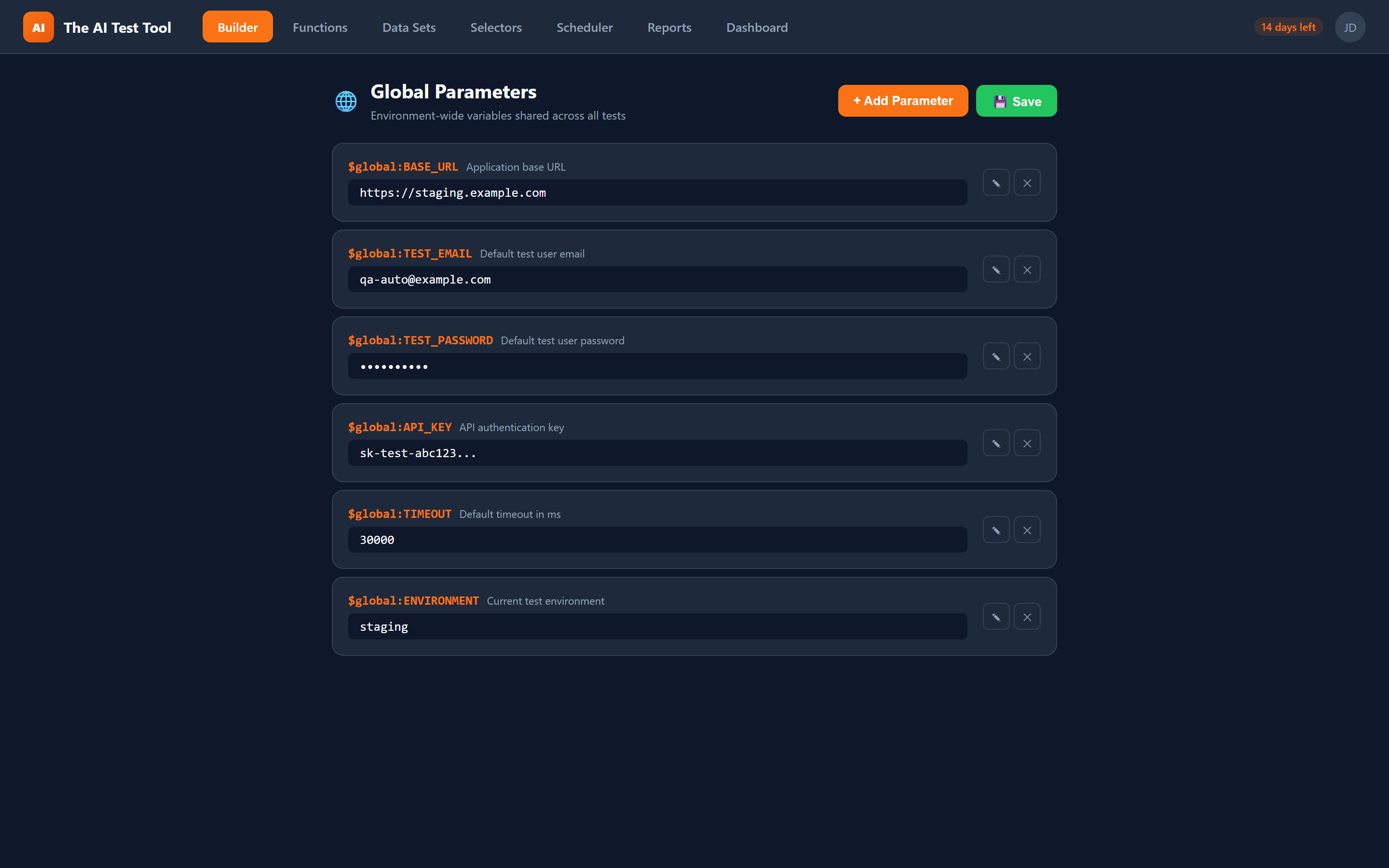
How Global Parameters Work
Global parameters are key-value pairs you define at the project or account level. Each parameter has a name and a value that can be referenced in any test step using the $global:VARNAME syntax. When CFTR generates the Playwright code, it replaces every reference with the actual value from an auto-generated parameter file.
This reference system extends beyond global parameters. Function blocks accept parameters accessed with $param:paramName.field, and data-driven tests reference dataset columns with $dataset:Name.field. All three prefixes follow the same dollar-sign syntax, making them easy to learn and consistent to use.
You can override global parameter values per environment. Define a $global:BASE_URL that points to your staging server by default, then override it to point to production when scheduling a production smoke test. The same tests run everywhere — only the parameters change.
Key Capabilities
A unified reference system that eliminates hardcoded values and makes your tests portable across environments.
The CFTR Reference System
A consistent dollar-sign prefix system lets you reference parameters, datasets, and selectors from any test step.
$global:VARNAME
References a global parameter defined at the account or project level. Use this for values that stay constant across all tests in an environment, such as base URLs, admin credentials, or API endpoints.
Example: $global:BASE_URL resolves to https://staging.myapp.com
$param:paramName.field
References a parameter passed into a reusable function. When you call a function block from a test, you pass parameter values that the function accesses with this prefix. This keeps functions generic and reusable across different contexts.
Example: $param:loginCredentials.username resolves to the value passed by the calling test
$dataset:Name.field
References a column in a dataset for data-driven testing. During iteration, each row provides different values. Combine dataset references with global parameters to test multiple data sets against different environments.
Example: $dataset:Users.email resolves to a different email for each row
$sel:Name
References a selector from the Selector Library. While not a parameter per se, it follows the same reference syntax pattern and can be used alongside parameter references in the same test step.
Example: $sel:LoginButton resolves to the primary locator with fallback chain
Why Global Parameters Matter
Hardcoded values scattered across tests are a maintenance nightmare. Global parameters solve this at the source.
Eliminate Hardcoded Values
Every test that logs in with admin credentials, navigates to a base URL, or checks an API endpoint should reference a global parameter instead of a hardcoded string. When the staging URL changes, you update one parameter instead of searching through hundreds of test steps.
Environment Switching
Run the same tests against staging, production, and QA environments by switching a single set of global parameters. No test modifications needed. Define a parameter set per environment and toggle between them when scheduling runs or executing manually.
Secure Credential Management
Store sensitive values like passwords, API keys, and tokens as global parameters instead of embedding them in test steps. Parameters are stored securely and referenced by name, so sensitive values never appear in test definitions or exported code in plain text.
Consistent Test Configuration
Feature flags, timeout values, and configuration settings used across multiple tests can be defined once as global parameters. When you need to adjust a timeout or toggle a feature flag for testing, change the parameter value and every test picks up the new setting.