Build once, use everywhere
Create a library of reusable, parameterized test functions for login flows, navigation sequences, form submissions, and more. Share them across tests and teams, and never duplicate automation logic again.
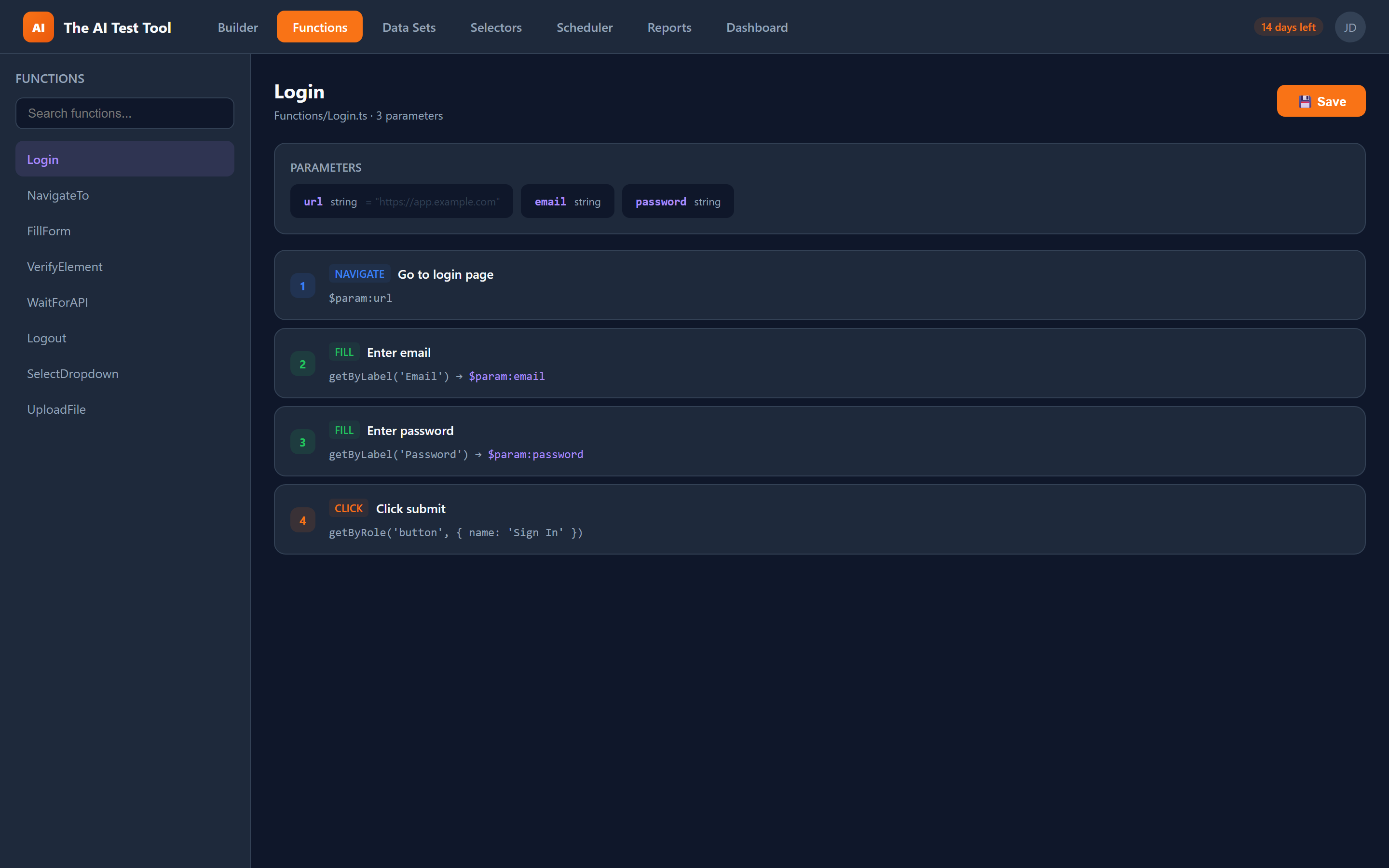
How the function library works
The reusable function library is a core part of CFTR's approach to scalable test automation. Instead of copying and pasting the same steps across dozens of test files, you create a function once and reference it by name wherever it is needed.
Functions are built using the dedicated Function Builder mode, which provides the same visual interface as the Spec Builder but generates standalone TypeScript functions instead of test files. Each function can accept typed parameters with default values, making them flexible enough to handle variations in your test scenarios.
When you reference a function in a test, CFTR automatically generates the correct TypeScript import statement and function call. Parameters are passed using the $param:paramName.field reference syntax, which the code generator resolves into clean, typed function arguments.
Key capabilities
Everything you need to build, manage, and share reusable test functions across your organization.
- Create parameterized function blocks with typed parameters
- Define default values for every parameter
- Share functions across tests and teams within a project
- Nested function calls — call functions from other functions
- Visual Function Builder with the same UI as the Spec Builder
- Auto-generated TypeScript imports when functions are referenced
- Function Builder mode separate from Spec Builder mode
- Reference system with $param:paramName.field syntax
- Functions available in the step type dropdown for easy insertion
- Full code preview showing the generated TypeScript function
Common function examples
These are the types of reusable functions teams build most frequently. Each one eliminates repeated logic and centralizes maintenance in a single location.
Login Flow
Create a reusable login function that accepts username and password as parameters. Every test that requires authentication calls this single function instead of duplicating login steps. When the login page changes, you update one function and all tests are fixed.
Navigation Sequence
Build a function that navigates to a specific section of your application through a series of menu clicks and page loads. Parameterize the target page name so the same function handles navigation to any section of your app.
Form Submission
Encapsulate a complete form-filling workflow into a single function. Pass in the form data as parameters and the function handles filling every field, selecting dropdowns, checking boxes, and clicking submit. Reuse it across create, edit, and validation tests.
Data Cleanup
Create a teardown function that deletes test data after a test run. Accept the resource type and identifier as parameters. Call it in afterEach hooks to keep your test environment clean without repeating cleanup logic in every test file.
Why reusable functions matter
As your test suite grows, duplicated logic becomes the biggest source of maintenance overhead. A single UI change can break dozens of tests that all contain the same copied steps. Reusable functions solve this by centralizing common workflows into a single, version-controlled location.
When a page layout changes, you update the function once and every test that references it is automatically fixed. This dramatically reduces the time spent maintaining your test suite and improves test reliability across the board.
Functions also enable better collaboration. Senior automation engineers can build robust, well-tested functions that the entire team uses, ensuring consistency and quality across all test files without requiring everyone to be an expert in Playwright internals.