Selector Library with Automatic Fallbacks
Centralize every selector in one library. When a primary locator breaks, fallback chains keep your tests running automatically — reducing maintenance and eliminating flaky failures.
How the Selector Library Works
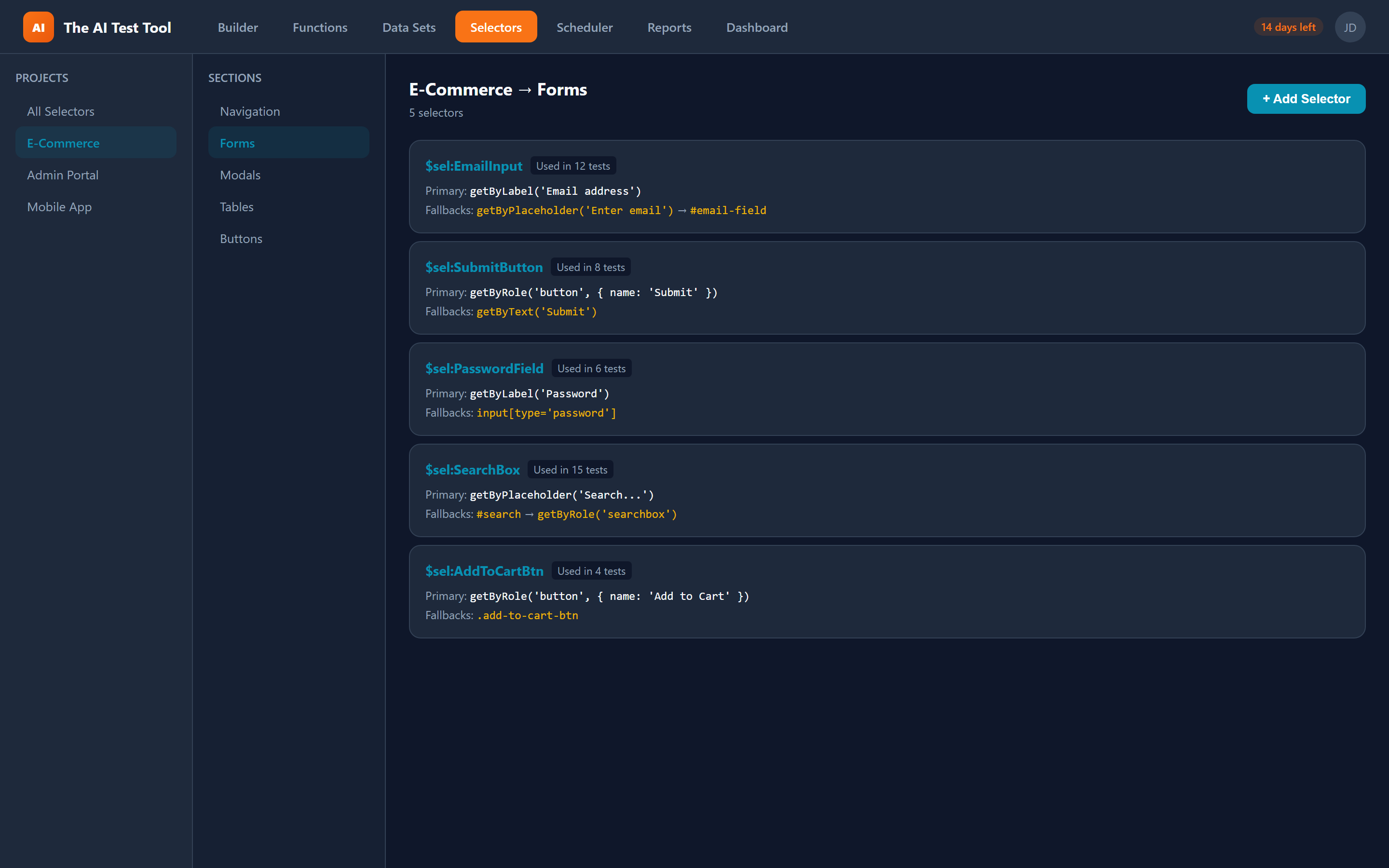
The Selector Library gives you a centralized place to define, organize, and manage every locator your tests depend on. Each selector entry has a human-readable name, a primary locator, and one or more fallback locators. In your test steps, you reference selectors using the $sel:Name syntax in any locator field.
When CFTR generates the Playwright code, it automatically converts each selector reference into a .or() fallback chain. If the primary locator cannot find an element on the page, Playwright tries each fallback in order. This means a minor CSS class change or DOM restructure does not instantly break your entire test suite.
Selectors are organized into projects and sections that mirror your application structure. A login page might have its own section with selectors like $sel:UsernameField, $sel:PasswordField, and $sel:LoginButton. Every team member sees the same organized library and can reuse selectors instead of writing ad-hoc locators.
Key Capabilities
Everything you need to manage selectors at scale, keep tests resilient, and collaborate across your team.
Why Centralized Selectors Matter
Scattered, hardcoded selectors are the number one cause of brittle test suites. The Selector Library solves this at the root.
Resilient Tests
When a primary selector breaks due to a UI change, the fallback chain kicks in automatically. Your tests keep passing while you update the selector at your own pace, instead of scrambling to fix dozens of broken tests at once.
Single Source of Truth
Every selector lives in one centralized library instead of being scattered across individual test steps. Update a selector once and every test that references it picks up the change immediately, eliminating duplication and drift.
Faster Debugging
Usage tracking tells you exactly which tests depend on a given selector. When a page redesign lands, you know the blast radius before you start fixing anything. No more guessing which tests might break.
Team Collaboration
Organize selectors by project and section so team members can find and reuse existing locators instead of creating duplicates. Shared naming conventions keep your selector library clean and consistent.
Real-World Use Case
Imagine your application redesigns its navigation bar. Without a selector library, you would need to find and update every test that clicks a nav link — potentially dozens of files. With CFTR, you update the selector entry once in the library. Every test referencing $sel:NavDashboard automatically picks up the new locator.
Even before you make that update, fallback selectors can bridge the gap. If your primary selector targets a CSS class that changed, but your fallback targets a data-testid attribute that stayed the same, your tests never fail in the first place. You still get a warning in the report so you know the primary selector needs attention.
This approach scales across teams. QA engineers, developers, and managers can all see which selectors are in use, which tests depend on them, and where fragile locators need attention. The result is a test suite that stays green through routine UI changes instead of turning red overnight.