Build Playwright tests without writing code
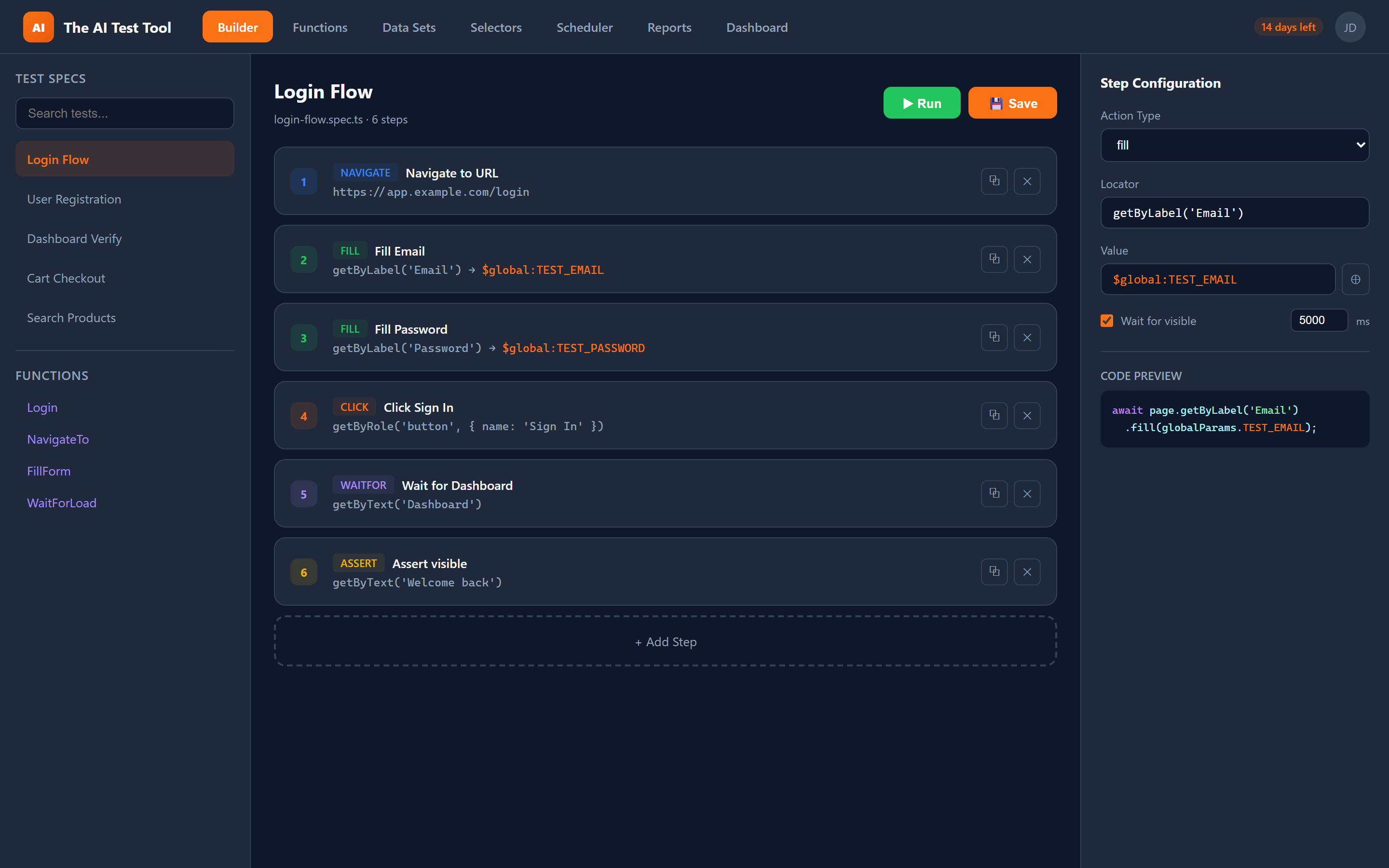
CFTR's visual test builder lets you create robust, production-ready Playwright tests through an intuitive drag-and-drop interface. Add steps, configure locators, set assertions, and preview the generated TypeScript code in real time.
Two powerful builder modes
Choose the right mode for the job. Build complete test specifications or create reusable function blocks that can be shared across your entire test suite.
Spec Builder
Create complete .spec.ts test files with the Spec Builder mode. Each spec can contain multiple test blocks with their own describe and test wrappers. The builder generates the full Playwright test structure including imports, test.describe blocks, and beforeEach/afterEach hooks.
You can add navigation steps, interact with page elements, fill forms, set assertions, and chain everything together in a logical flow. The generated code is clean, idiomatic TypeScript that follows Playwright best practices.
Function Builder
Build reusable function blocks with the Function Builder mode. Functions are standalone units of automation that accept parameters and can be called from any test. Use them for common workflows like login flows, navigation sequences, and form submissions.
Function Builder uses the same visual interface as Spec Builder but generates exportable TypeScript functions with typed parameters. Functions are automatically available in the function library for use across all your tests.
Every step type you need
The visual builder supports a comprehensive set of step types covering navigation, interaction, validation, and advanced scenarios. Each step type has a dedicated configuration panel with all available options.
Navigate
Direct the browser to any URL, with configurable wait-until conditions.
Click
Click elements using smart locators with optional force and position options.
Fill
Type text into input fields, textareas, and content-editable elements.
Select
Choose options from dropdown menus by value, label, or index.
Check / Uncheck
Toggle checkboxes and radio buttons on or off.
Hover
Simulate mouse hover to trigger tooltips, menus, and reveal elements.
Assert
Verify visible, hidden, text content, input value, URL, and page title.
Wait
Pause execution for a fixed duration or until a condition is met.
Keyboard
Send keyboard shortcuts and key combinations like Enter, Tab, or Ctrl+A.
Screenshot
Capture full-page or element-level screenshots at any point in the test.
Custom Code
Insert raw Playwright TypeScript when you need full programmatic control.
Smart features that accelerate your workflow
The visual builder is packed with intelligent features designed to reduce friction and help you build tests faster. From automatic locator detection to live code preview, every detail has been considered.
- Smart locator detection with Playwright's built-in selector engine
- Visual assertion builder supporting visible, hidden, text, value, URL, and title checks
- Drag-and-drop step reordering with insert, duplicate, and delete controls
- Instant code preview that updates as you configure each step
- Playwright Codegen integration to record browser interactions directly
- Wait conditions and configurable timeouts on every step
- Reference selectors from the Selector Library with $sel:Name syntax
- Reference global parameters with $global:VARNAME syntax
Why teams choose the visual builder
The visual test builder bridges the gap between manual testing and full code-based automation, making it accessible to everyone on the team while producing production-quality output.
Faster Test Creation
Build complete end-to-end tests in minutes instead of hours. The visual interface eliminates the need to memorize Playwright APIs or write boilerplate code from scratch.
Lower Barrier to Entry
QA analysts, product managers, and manual testers can create automated tests without learning TypeScript or Playwright syntax. The builder guides you through every step.
Maintainable Tests
Every test built in the visual builder exports clean, readable TypeScript that developers can review, extend, and version-control alongside application code.
Fewer Errors
Smart locator detection and built-in validation catch common mistakes before your test ever runs. The builder warns you about missing locators, invalid selectors, and incomplete assertions.